
The canvas builder
Draw a stack, and meshDeck writes the compose file.
Open the builder from + → Builder… (or Deploy → Builder… on iPad). It lists your drafts, which are stored on the phone. New draft creates one called new-stack.
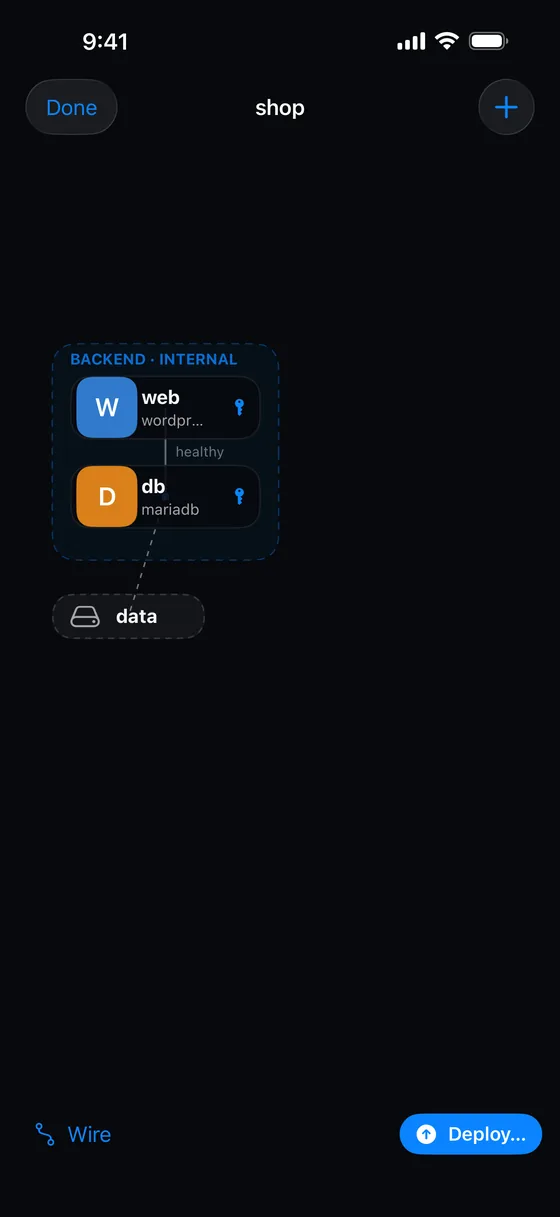 <figcaption>Services, wires and volumes on the canvas.</figcaption>
The canvas
The + menu adds things and opens tools:
- Add service, Add volume, Networks…
- Auto layout arranges the chips for you.
- Rename…
- Preview compose shows the generated
compose.yaml, with Copy.
Done saves and closes.
A service is a chip with an avatar, its name and its image (or “no image” in amber), and a key icon if it uses vault values. A volume is a dashed chip. A network is a dashed region labelled with its name (and “INTERNAL” if it has no outside access). Drag chips to move them, and tap one to edit it.
Wiring
Turn on Wire at the bottom, then drag from one service to another, or to a volume.
- Service to service means “A depends on B”. Choose whether to wait until B is started, healthy or finished. The wire is a solid curve labelled with the condition.
- Service to volume means “Mount the volume in the service”. Give the container path, and choose Read-only if you like. The link is dashed.
The service form
A service has a Name, an Image, an optional Command, a Restart policy (Never, Unless stopped, Always, On failure), a Privileged switch, Environment, Ports, Mounts, the Networks it joins, what it Depends on, and an optional Health check (a command, an interval, retries and a start period). Other services can wait for a health-checked service to be healthy.
Problems
The builder shows up to three problems at a time, and Deploy… stays disabled until they are fixed. They include: no services, an invalid or duplicate name, a service without an image, a dependency loop, the same host port published twice, a mount with no container path, and two services that would share the same secret names.
The compose file it writes
The output is deterministic and sorted, with every value double-quoted and no version: line. It contains services, volumes and networks, and each service carries only these keys, where you set them: image, command, environment, ports, volumes, networks, depends_on (with its condition), restart, healthcheck and privileged. Nothing else, such as build, labels or env_file, is written.
Vault values become ${SERVICE_KEY} placeholders in the file, and their values travel in the stack’s environment, so the file never holds a secret.
Deploying
Deploy… lists the hosts that can create stacks. For a new deployment it opens New stack pre-filled (“From the builder”), so you can review it first. Once a draft is linked to a stack on a host, the menu offers <host> (redeploy <stack>), which rewrites the compose file and redeploys straight away, without pulling and without asking, then closes the builder.
Drafts are not backed up
Drafts live on your phone. Deleting one (press and hold, Delete draft) does not ask for confirmation.
Something missing or wrong? Tell us.