
AI diagnosis
Ask a model what is wrong with a container, with your own key, and only when you tap.
When a container is Down or Unhealthy, meshDeck can send a masked summary of it to an AI model and show you a plain-English cause and some suggested actions. It is optional, it is off until you set it up, and it only ever runs when you tap What’s wrong?.
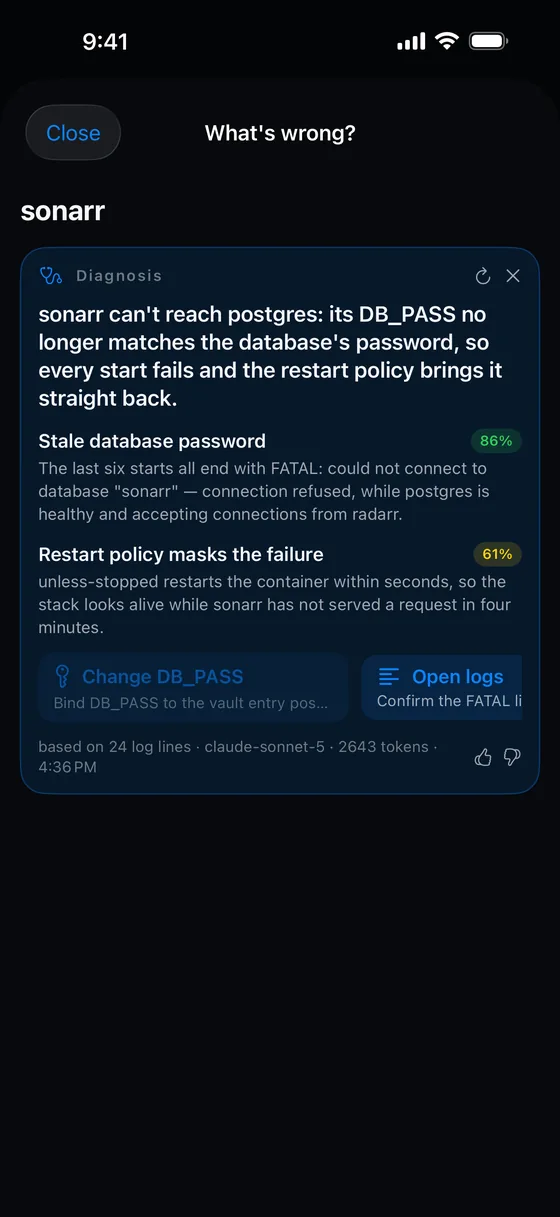 <figcaption>A verdict: a summary, causes with confidence, and actions you can tap.</figcaption>
Setting it up
Under Settings → Diagnosis:
- Choose a Provider: Anthropic, or OpenAI-compatible.
- Check the Model. The defaults are
claude-sonnet-5for Anthropic andgpt-4o-minifor OpenAI-compatible. Switching provider resets it. - For OpenAI-compatible, set the Base URL. The default is
https://api.openai.com/v1. It also works with self-hosted servers that speak the same API, such as Ollama, LM Studio and vLLM. Anhttp://address is allowed for a server on your LAN or tailnet, but that traffic is not encrypted. - Paste your API key and tap Save. It is stored in the Keychain and travels only in the request header. It is optional for local servers. Remove deletes it.
- Turn on Send container data to this provider. This is your consent. It reads: “Inspect state, recent logs, stats and events, with secrets masked. Only when you tap What’s wrong?, never automatically.”
- Tap Test connection. You should see “Connected · <model>”.
It is your key and your bill. meshDeck does not see your requests and runs no server in the path.
Asking
Open a Down or Unhealthy container and tap What’s wrong?, or, on the Topology tab, tap the stethoscope on the broken-link card. You will see “Gathering inspect, logs and events…” and then “Asking <provider>…”.
The answer
The DIAGNOSIS card has:
- a summary;
- up to three causes, each with a confidence figure (green from 70%, amber from 40%, grey below);
- up to three actions, each with a reason;
- a footer with the number of log lines used, the model, tokens and time, and thumbs up and down, which are stored only on your device.
Ask again repeats it, and Dismiss diagnosis clears it. The result is not saved.
The actions
A diagnosis can only suggest from this fixed list. Anything else the model says is dropped.
| Action | What it does | Asks first? |
|---|---|---|
| Restart | Restarts the container. | No. It runs when you tap. |
| Start | Starts it (or resumes it if paused). | No. |
| Pull & recreate | Pulls the image and recreates the container. | Yes. |
| Recreate | Recreates it with the same settings. | Yes. |
| Change <KEY> | Opens the environment editor to change a variable. | It opens an editor. Save & recreate is the action. |
| Open logs | Opens the logs. | It only navigates. |
| Topology | Opens the map. | It only navigates. |
Nothing runs by itself. Every action needs your tap, and Stop, Kill and Remove are never offered. The model has no chat, no shell, and no way to run a command.
What is sent
Only when you tap, and from your phone straight to your provider: the container’s name, image, status, health, exit code and restart count; its command and environment; up to 200 recent log lines (8 KB at most); about a minute of CPU and memory readings; the names of linked containers, volumes and networks; its events from the last 15 minutes; and the engine version. Secrets are masked first, and if something that still looks like a secret remains, nothing is sent.
Masking works on patterns. It cannot recognise a secret that looks like ordinary text. Read the Security page for what it does and does not catch.
If it fails
The message says why: the provider rejected the key, it answered with an error, the reply could not be read or was cut short, or the provider could not be reached. If the evidence still contained something that looks like a secret you will see “nothing was sent”.
Something missing or wrong? Tell us.