
Overview
What meshDeck is, what you need, and how the app is laid out.
meshDeck is a native app for iPhone and iPad that shows the containers on your Docker, Podman and Portainer hosts and lets you act on them. It connects from your phone straight to your hosts, over Tailscale, SSH or HTTPS. There is no account, and there is no server of ours in the connection.
What you need
- An iPhone or iPad running iOS 26 or later.
- A host running Docker or Podman that you can reach by SSH (your username needs to be able to use the engine’s socket, see Podman hosts for rootful and rootless Podman), or a Portainer server and an access token.
- Optionally, a Tailscale account, if you want to reach hosts on your tailnet. meshDeck has a built-in Tailscale node, so the Tailscale app is not required.
Nothing to open on the host
meshDeck never asks you to expose Docker’s or Podman’s API on the internet. It reaches the engine’s socket through an SSH session, or talks to Portainer over HTTPS with a token you create.
How the app is laid out
On iPhone there are three tabs: Fleet, Topology and Settings.
- Fleet is the home screen. It shows the selected host: a summary card, your stacks and your containers.
- Topology draws a map of how the containers on a host depend on each other.
- Settings holds your hosts, the built-in Tailscale node, notifications, the vault, AI diagnosis and your plan.
On iPad (and other regular-width layouts) the same things become a three-column cockpit: hosts and stacks on the left, containers in the middle, and the container you picked on the right. See iPad and shortcuts.
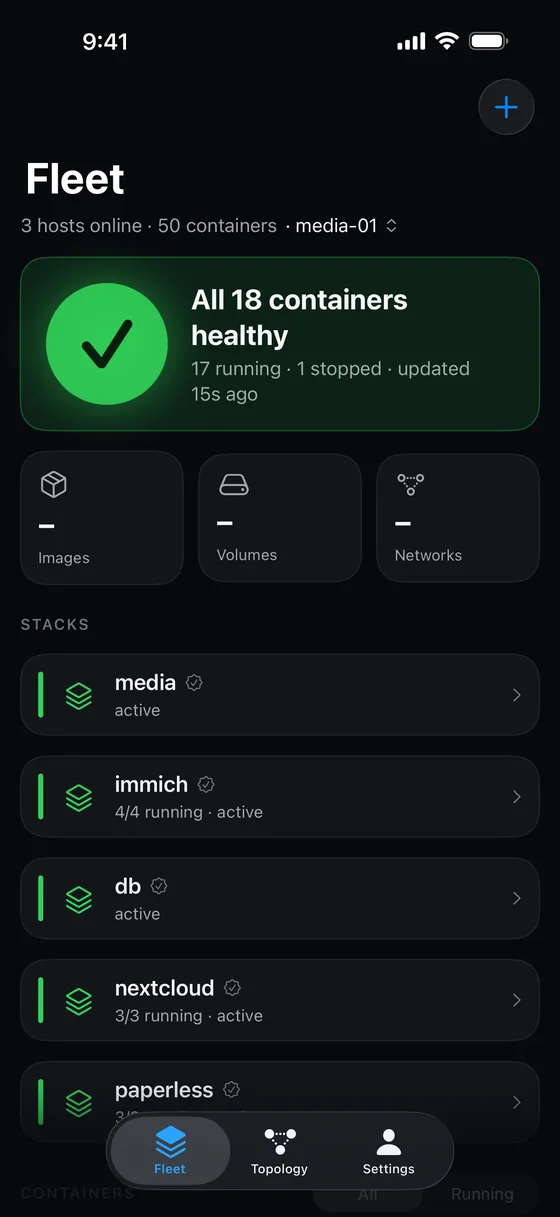 <figcaption>The Fleet tab on a healthy host.</figcaption>
What the colours mean
Colour is never the only signal: every status also has its own icon.
| Status | Colour | Meaning |
|---|---|---|
| Down | Red | Dead, exited with an error, killed for memory, or stuck in a restart loop. |
| Unhealthy | Amber | Running, but its health check is failing. |
| Starting | Amber | Starting up, restarting cleanly, or being removed. |
| Healthy | Green | Running, and its health check passes. |
| Running | Green | Running, with no health check defined. |
| Stopped | Grey | Created, paused, or exited cleanly. |
Only Down and Unhealthy count as “needs attention” on the summary card.
Something missing or wrong? Tell us.